
This is documentation for the next version of Grafana Beyla documentation. For the latest stable release, go to the latest version.

How Grafana Beyla works
Beyla uses eBPF to capture metrics and traces from your applications.
eBPF overview
eBPF is a Linux kernel technology that runs small, sandboxed programs inside the kernel.
These programs can observe system calls and the network stack, and can attach to functions inside running applications through user space probes, also known as uprobes.
Beyla is the user space program that loads its eBPF programs into the kernel and collects the data they produce. Beyla and its eBPF programs exchange data through eBPF maps, such as ring buffers and hash maps.
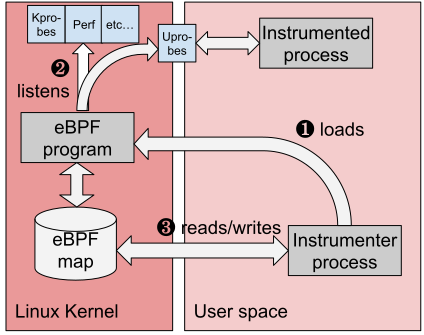
eBPF programs use their own virtual machine instruction set. The kernel checks every program before it runs and rejects any program that could access memory unsafely or run forever. The kernel then compiles the program to native machine code for the host CPU, so it runs efficiently.
How Beyla instruments an application
Beyla runs on the same host as the applications it instruments, outside the application processes. Beyla follows these steps:
- Beyla finds the processes to instrument, based on your service discovery configuration.
- Beyla inspects the executable of each process to identify the language and runtime it uses.
- Beyla attaches eBPF probes. Kernel probes capture network activity, such as connections, reads, and writes, and Beyla filters the events by process. User space probes attach to functions in the language runtime or libraries of the process, for example in Go applications.
- When the application receives or sends a request, the probes capture events about the request and pass them to Beyla.
- Beyla converts the events into metrics and trace spans, and adds metadata. For example, when Beyla runs in Kubernetes, it adds Pod and namespace names.
- Beyla exports the metrics and traces in the OpenTelemetry format, as native Prometheus metrics, or both.
For Java and Node.js applications, Beyla also loads a small language agent into the application process by default. These agents provide features that eBPF alone can’t, such as context propagation. For details, refer to Configure Beyla language specific agents.
When you enable it, Beyla can also propagate trace context between services, so spans from different services join the same distributed trace.
Where Beyla sends data
Beyla exports data in open formats, so you can choose your backend:
- Send OpenTelemetry metrics and traces to Grafana Alloy or an OpenTelemetry Collector for processing and routing.
- Send OpenTelemetry metrics and traces directly to an OTLP endpoint, such as Grafana Cloud.
- Expose a Prometheus endpoint that Prometheus or Grafana Alloy can scrape.
To configure exports, refer to Configure Beyla Prometheus and OpenTelemetry data export.
In Grafana, you can correlate Beyla metrics and traces with your logs and infrastructure data. In Grafana Cloud, Application Observability and Knowledge Graph use Beyla metrics and traces. To set up Beyla for Grafana Cloud, refer to Deploy Beyla in Kubernetes with Helm for Grafana Cloud.
Where Beyla runs
You can run Beyla in the following ways:
- As a standalone process on a Linux host or virtual machine
- As a Docker container
- In Kubernetes, as a DaemonSet or as a sidecar container
- Inside Grafana Alloy, with the
beyla.ebpfcomponent
To choose a deployment method, refer to Set up Beyla.